Animation
    <div id="div1"></div>
    <div id="div2"></div>
    <div id="div3"></div>
    <div id="div4"></div>
#div1 {
    width: 200px; height: 200px; background-color: red;
    animation: abc 10s; /*이름 : 사용자지정, 몇 초 내에 끝낼 것인지*/
}
@keyframes abc {
    20% {margin-left: 400px;} /*총 시간의 20%에 해당하는 시간에 margin-left : 400px 이동 */
    /*나머지 80% 시간 동안 다시 되돌아옴 */
}

#div2 {
    width: 200px; height: 200px; background-color: red;
    animation: aaa 10s;
}
@keyframes aaa {
    0% {margin-left: 400px; background-color: green;}
}

#div3 {
    width: 200px; height: 200px; background-color: red;
    animation: bbb 5s infinite; /* infinite 계속 반복 */
    animation-delay: 2s; /* 2초 뒤 시작 */
}
@keyframes bbb {
    50% {margin-left: 400px;}
}

#div4 {
    width: 100px; height: 100px; background-color: gold;
    animation: box 4s infinite;
}
@keyframes box {
    25% {margin-left: 50px; margin-top: 0;} /* 4s * 1/4s 시간에 해당 위치에*/
    50% {margin-left: 50px; margin-top: 50px;} /* 위에 실행된 다음 4 * 1/2s 시간에 해당 위치에 */
    75% {margin-left: 0; margin-top: 50px;}
    100% {margin-left: 0; margin-top: 0;}
}
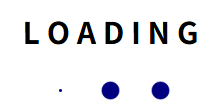
예제
    <h2>L O A D I N G</h2>
    <div id="loading">
        <div class="logo"></div>
        <div class="logo"></div>
        <div class="logo"></div>
    </div>
#loading { display: flex; justify-content: center;}
h2 {
    text-align: center;
}
.logo {
    width: 20px; height: 20px; background-color: navy;
    border-radius: 20px; margin: 0 10px;
    animation: loading 1s infinite;
}
#loading :nth-of-type(2) {
    animation-delay: 0.2s;
}
#loading :nth-of-type(3) {
    animation-delay: 0.2s;
}
@keyframes loading {
    50% {
        transform: scale(0);
    }
}
    <div id="wrap">
        <div class="block"></div>
        <div class="block"></div>
        <div class="block"></div>
        <div class="block"></div>
    </div>
#wrap {
    width: 100px; margin: 200px auto; background-color: bisque;
}
.block {
    width: 50px; height: 8px; margin-bottom: 15px;
    background-color: navy;
    animation: block 1s infinite;
}
@keyframes block {
    50% { transform: translateX(50px);}
}
/* #wrap :nth-of-type(3) {
    animation-delay: 0.25s;
}
#wrap :nth-of-type(4) {
    animation-delay: 0.25s;
} */
#wrap :nth-of-type(2n) { animation-delay: 0.2s;}
 그룹 지어서 움직이기
animation-fill-mode
    <div id="div5">
        <h1 id="left">안녕하세요</h1>
        <h1 id="right">만나서 반갑습니다</h1>
    </div>
h1 {
    position: relative; opacity: 0; /*투명도*/
}
#left {
    left: -150px;
    animation: left 3s;
    animation-fill-mode: forwards; /* 애니메이션 끝나도 안 돌아가고 남아있음(100%에서의 상태)*/
}
#right {
    right: -500px;
    animation: right 3s;
    animation-fill-mode: forwards;
}
@keyframes left {
    100% {
        left: 300px; opacity: 1;
    }
}
@keyframes right {
    100% {
        right: -150px; opacity: 1;
    }
}
- animation-fill-mode : 100% 시간에서 애니메이션 끝나도 위치를 고정시킴

예시 2
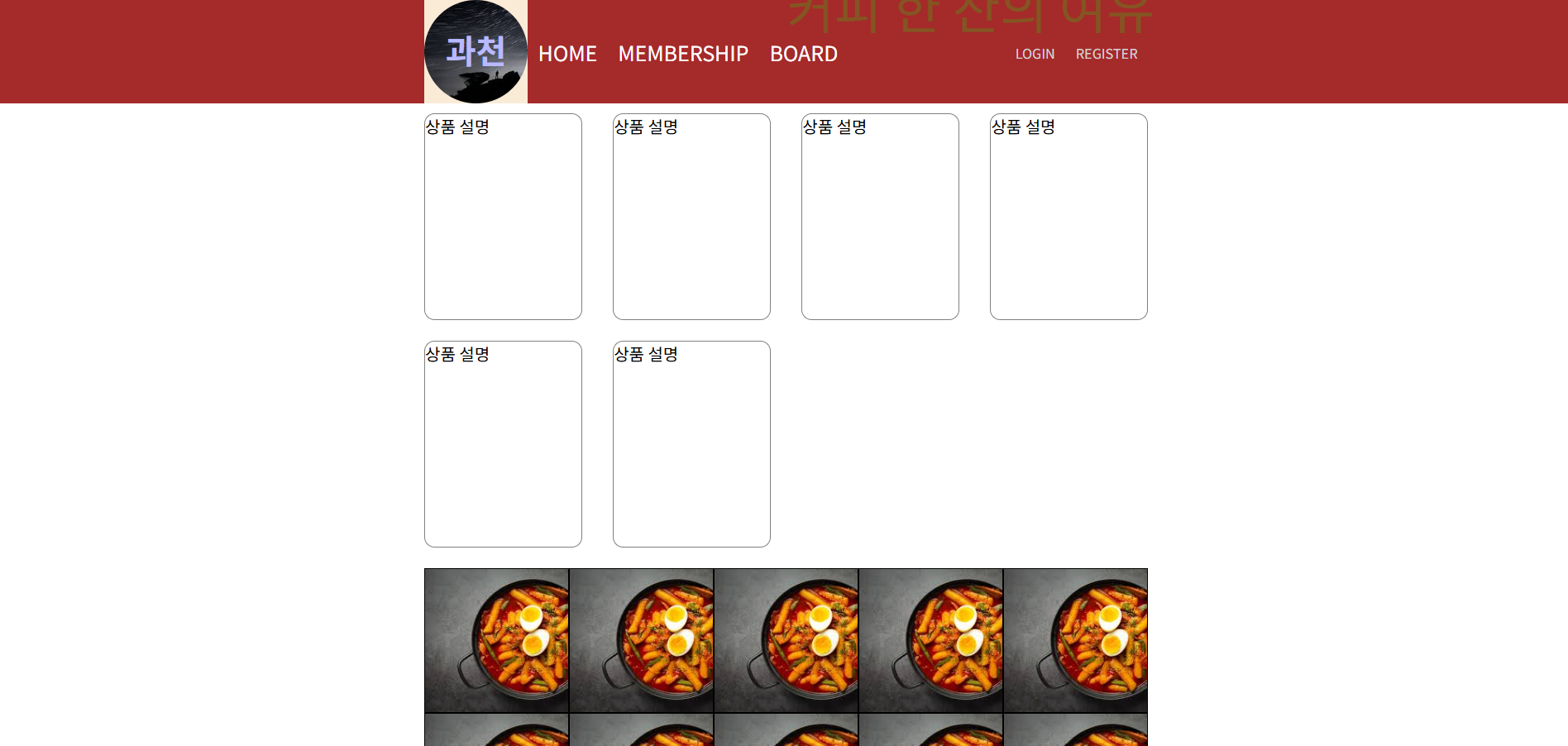
<!DOCTYPE html>
<html lang="en">
<head>
    <meta charset="UTF-8">
    <meta name="viewport" content="width=device-width, initial-scale=1.0">
    <title>Ex16</title>
    <link href="ex16.css" rel="stylesheet" type="text/css">
</head>
<body>
    <div id="header_wrap">
        <header id="header">
            <h1 id="title_logo">
                <div>과천</div>
            </h1>
            <nav id="nav">
                <ul>
                    <li><a href="#">HOME</a></li>
                    <li><a href="#">MEMBERSHIP</a></li>
                    <li><a href="#">BOARD</a></li>
                </ul>
                <ul>
                    <li><a href="#">LOGIN</a></li>
                    <li><a href="#">REGISTER</a></li>
                </ul>
            </nav>
        </header>
    </div>
    <main id="main">
        <section id="section_1">
            <div>
                <div class="img"></div>
                <div>상품 설명</div>
            </div>
            <div>
                <div class="img"></div>
                <div>상품 설명</div>
            </div>
            <div>
                <div class="img"></div>
                <div>상품 설명</div>
            </div>
            <div>
                <div class="img"></div>
                <div>상품 설명</div>
            </div>
            <div>
                <div class="img"></div>
                <div>상품 설명</div>
            </div>
            <div>
                <div class="img"></div>
                <div>상품 설명</div>
            </div>
            <div>
                <div class="img"></div>
                <div>상품 설명</div>
            </div>
            <div>
                <div class="img"></div>
                <div>상품 설명</div>
            </div>
            <div>
                <div class="img"></div>
                <div>상품 설명</div>
            </div>
            <div>
                <div class="img"></div>
                <div>상품 설명</div>
            </div>
        </section>
        <section id="section_2">
            <ul>
                <li>
                    <div class="list">
                        <a href="#">구독</a> |
                        <a href="#">좋아요</a>
                    </div>
                </li>
                <li>
                    <div class="list">
                        <a href="#">구독</a> |
                        <a href="#">좋아요</a>
                    </div>
                </li>
                <li>
                    <div class="list">
                        <a href="#">구독</a> |
                        <a href="#">좋아요</a>
                    </div>
                </li>
                <li>
                    <div class="list">
                        <a href="#">구독</a> |
                        <a href="#">좋아요</a>
                    </div>
                </li>
                <li>
                    <div class="list">
                        <a href="#">구독</a> |
                        <a href="#">좋아요</a>
                    </div>
                </li>
                <li>
                    <div class="list">
                        <a href="#">구독</a> |
                        <a href="#">좋아요</a>
                    </div>
                </li>
                <li>
                    <div class="list">
                        <a href="#">구독</a> |
                        <a href="#">좋아요</a>
                    </div>
                </li>
                <li>
                    <div class="list">
                        <a href="#">구독</a> |
                        <a href="#">좋아요</a>
                    </div>
                </li>
                <li>
                    <div class="list">
                        <a href="#">구독</a> |
                        <a href="#">좋아요</a>
                    </div>
                </li>
                <li>
                    <div class="list">
                        <a href="#">구독</a> |
                        <a href="#">좋아요</a>
                    </div>
                </li>
            </ul>
        </section>
    </main>
    <div id="srr">
        커피 한 잔의 여유
    </div>
</body>
</html>
* {
    margin: 0; padding: 0; box-sizing: border-box; /*box-sizing : border */
}

#header_wrap{
    width: 100%; background-color: brown;
    position: fixed; top: 0;
}

#header {
    width: 700px; height: 100px;
    background-color: antiquewhite;
    display: flex; margin: 0 auto;
}
#title_logo {
    background-color: aquamarine;
    width: 100px;
    border-radius: 100px;
    background-image: url(image01.jpg);
    background-size: cover;
}
#title_logo > div {
    color: white; margin-top:25px;
    animation: title 0.8s infinite;
    text-align: center;
}
@keyframes title {
    25% {
        color: aquamarine;
    }
    50% {
        color: red;
    }
    75% {
        color: blue;
    }
}
#nav {
    display: flex;
    justify-content: space-between;
    width: 600px;
    background-color: brown;
}
#nav ul {
    list-style: none;
    display: flex; align-items: center; /* align-items : 위아래 */

}

#nav ul li {
    margin: 0 10px;
}
#nav ul li a {
    text-decoration: none;
    color: white; font-size: 20px;
    &:hover {
        color: orange; border-bottom: 2px solid orange;
        padding-bottom: 5px; transition: 0.25s;
    }
}

#nav ul:nth-of-type(2) a {
    font-size: 13px; color: lightgray;
}

#main {
    width: 700px; margin: 100px auto;
}
#section_1 {
    display: flex;
    flex-wrap: wrap; /* 초과하는 사이즈는 부모 사이즈에 따라 밑으로 보냄 */
}
/*
    여백 계산
    (700 - 3 * 30px) / 4 = 152.5
*/
#section_1 > div {
    border: 1px solid gray;
    border-radius: 10px;
    width: 152.5px; height: 200px;
    margin-top: 20px;
    margin-right: 30px;
    &:nth-of-type(4n) {margin-right: 0;}
}
#section_1 > div:nth-of-type(1) .img {
    width: 130px; height: 150px;
    background-image: url(image05.jpg);
    background-size: cover;
    background-repeat: no-repeat;
    border-radius: 5px;
    margin: 0 auto;
}

#srr {
    font-size: 50px;
    position: absolute;
    top: 200px; left: -20px;
    opacity: 0;
    animation: srr 2s;
    animation-fill-mode: forwards;
}
@keyframes srr {
    25% {
        color: aqua; opacity: 0.25;
    }
    50% {
        color: plum; opacity: 0.5;
    }
    75% {
        color: lime; opacity: 0.75;
    }
    100% {
        color: lime; opacity: 0.2; left: 50%;
    }
}

#section_2 {
    margin-top: 20px;
}
#section_2 ul {
    list-style: none; display: flex; flex-wrap: wrap;
}
#section_2 ul a {
    text-decoration: none; color: chocolate;
    &:hover {
        color: black; border-bottom: 2px dotted;
        padding-bottom: 4px;
    }
}
.list {
    text-align: center; margin: 50px; display: none;
}
#section_2 ul li {
    width: 140px; height: 140px; border: 1px solid;
    background-image: url(image02.jpg);
    background-size: cover;
    &:hover {
        background-color: lightblue;
        background-image: url();
        .list {
            display: block;
        }
    }
}