* {margin: 0; padding: 0;}먼저 설정하기
shadow
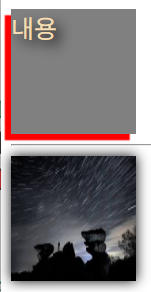
    <div id="div1">내용</div>
    <hr>
    <img src="image01.jpg">
#div1 {
width: 100px; height: 100px; background-color: gray;
color: wheat; font-size: 20px;
text-shadow: 5px 5px 10px black; /*오른쪽(음수면 왼쪽), 아래쪽(음수면 윗쪽) 뿌옇게 */
box-shadow: -5px 5px 1px red;
}
img {
width: 100px; height: 100px;
}
img:hover {
box-shadow: 0 0 10px black;
}
active
#div1:active {color: blue; background-color: aquamarine;}클릭하면 바뀜
input
    <div id="login">
        <h2 class="title">로그인</h2>
        <form>
            <input type="text" placeholder="input username"><br>
            <input type="password" placeholder="input password"><br>
            <button>LOGIN</button>
        </form>
    </div>
#login > form > input {
color: gray; font-size: 20px;
margin-top: 30px;
border: none;
outline: none;
border-bottom: 2px solid lightgray;
letter-spacing: 3px; width: 100%;
&:focus { /*포커스 되면(ex 입력하려고 클릭하고 입력 중일 때) */
border-bottom: 2px solid darkgray;
}
}
- focus
- letter-spacing
button
#login > form > button {
    margin-top: 20px;
    width: 100%; height: 30px;
    border: none;
    border-radius: 5px;
    font-size: 15px;
    font-weight: bold;
    cursor: pointer; /*커서가 손가락으로 바뀜*/
    background-color: lightgray;
    &:hover {
        background-color: gray;
        box-shadow: 0 0 2px black;
    }
}
- cursor
- font-weight
position
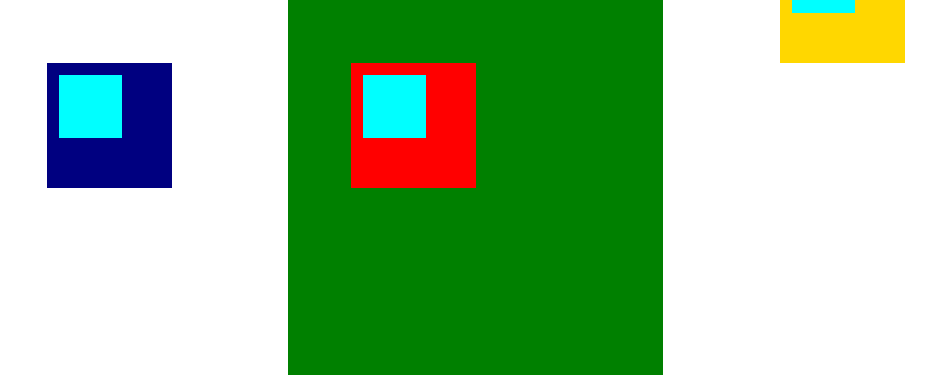
    <div id="wrap">
        <div id="relative"></div>
        <div id="absolute"></div>
        <div id="fixed"></div>
    </div>
#wrap {
width: 300px; height: 800px;
background-color: green;
margin: 100px auto;
}
#wrap div {
width: 100px; height: 100px;
}
#relative {
background-color: red;
top : 50px; left: 50px; position: relative;
}
#absolute{
background-color: gold;
top : 50px; left: 50px; position: absolute;
}
#fixed{
background-color: navy;
top : 50px; left: 50px; position: fixed;
}

- relative : 부모에 따라 달라짐
- absolute : 부모에서의 절댓값
- fixed : 화면 상에서 고정
- inherit : 부모 position
- static : 기본은 static
#relative {
    background-color: red;
    top : 50px; left: 50px; position: relative;
    & > div {
        top : 10px; left: 10px;
        position: inherit;
        background-color: aqua;
    }
}
#absolute{
    background-color: gold;
    top : 50px; right: 50px; position: absolute;
    & > div {
        top : 10px; left: 10px;
        position: inherit;
        background-color: aqua;
    }
}
#fixed{
    background-color: navy;
    top : 50px; left: 50px; position: fixed;
    & > div {
        top : 10px; left: 10px;
        position: absolute;
        background-color: aqua;
    }
}
z-index
    <div id="static2"></div>
    <div id="relative2"></div>
    <div id="absolute2"></div>
    <div id="fixed2"></div>
/*두 번째 예제*/
#static2, #relative2, #absolute2, #fixed2 {
width: 100px; height: 100px;
}
#static2 {
background-color: rebeccapurple;
z-index: 1;
}
#relative2 {
background-color: gray;
position: relative; top: -75px; left: 25px;
z-index: 2;
}
#absolute2 {
background-color: aqua;
position: absolute; top: 50px; left: 50px;
z-index: 1;
}
#fixed2 {
background-color: burlywood;
position: fixed; top: 75px; left: 75px;
z-index: 3;
}
숫자 높을 수록 위에 쌓임
    <a href="#">hover</a>
    <div id="modal">
        <h2>내용입니다</h2>
    </div>
#modal {
position: absolute;
background-color: rgba(0, 0, 0, 0.1);
top: 0; left: 0;
}
h2와 a가 겹쳐서 a가 안 눌릴 때
a {
    position: absolute;
    z-index: 10;
}
누를 수 있어짐
transform
<!DOCTYPE html>
<html lang="en">
<head>
    <meta charset="UTF-8">
    <meta name="viewport" content="width=device-width, initial-scale=1.0">
    <title>Ex14</title>
    <link href="ex14.css" rel="stylesheet" type="text/css">
</head>
<body>
    <div id="div1"></div>
    <div id="div2"></div>
    <div id="div3"></div>
    <div id="div4">
        <img src="image01.jpg">
    </div>
    <div id="div5">
        <img src="image01.jpg">
    </div>
    <div id="div6">
    </div>
    <div id="div7">
    </div>
    <div id="div8">

    </div>
</body>
</html>
rotate
#div1, #div2, #div3{
    width: 200px; height: 200px;
    background-image: url("image01.jpg");
    background-size: cover;
}

#div1{
    margin: 200px;
    transform: rotate(5deg);
}
#div2{
    margin-top: -300px;
    margin-left: 300px;
    transform: rotate(5deg);
}
#div2:hover {
    transform: rotate(1420deg);
}
scale
#div3 {
    margin: 100px;
    &:hover {
        transform: scale(1.5); /* scaleX 가로로 scaleY 세로로 */

    }
}

#div4, #div5 {
    width: 150px; height: 150px;
    background-color: gray; border: 10px solid red;
    margin-left: 200px;
    & img {
        width: 150px; height: 150px;
    }
}

#div4 img:hover {
    width: 180px; height: 180px;
}
#div5 img:hover {
    transform: scale(1.5);
}
hover시 scale과 width, height 변경과의 차이점
1. scale

2. width, height 변경

translate
#div6, #div7 {
    width: 150px; height: 150px; background-color: green;
    transition: 3s;
}
#div6:hover {margin-left: 400px;}
#div7:hover {transform: translateX(400px);}

#div8 {
    width: 150px; height: 150px;
    background-color: gold; transition: 3s;
    &:hover {
        transform: translateX(400px) rotate(360deg);
    }
}
margin left와 translateX와의 차이
1. margin-left

translateX

'IBM AI Agent 3기 > Frontend' 카테고리의 다른 글
| CSS 알아보기(2) (0) | 2025.12.18 |
|---|---|
| CSS 알아보기(1) (0) | 2025.12.17 |
| HTML 알아보기(2) (0) | 2025.12.16 |
| HTML 알아보기(1) (1) | 2025.12.15 |