The W3C Markup Validation Service
Validate by File Upload Note: file upload may not work with Internet Explorer on some versions of Windows XP Service Pack 2, see our information page on the W3C QA Website.
validator.w3.org
html 문법 확
태그
블록 요소 : 한 줄에 한 개
<h1></h1>
<p></p>
<div></div>
인라인 요소 : 한 줄에 여러 개, 텍스트만큼의 공간
<span></span>
<label></label>
블럭 안에 인라인 사용하기
<span> 안에<div> 자제하기
        <div>
            <span>블럭 안에 인라인</span>
        </div>

        <span>
            <div>인라인 안에 블록</div>
        </span>

        <!-- inline 요소 -->
        <strong>중요한 텍스트, 굵은 글씨</strong>
        <mark>주의 깊게 볼 텍스트</mark>
        <b>단순 굵은 글씨</b>
        <small>저작권 등을 정의하는 태그</small>
        <sup>위첨자</sup> <sub>아래첨자</sub>
        <del>1100가격 할인</del>
구분선
<hr>
h1 ~ h6
        <h1>문서의 제목(웹 사이트의 로고에 적용하는 태그)</h1>
        <h2>문서 내에서큰 숫자 순서로 작성(문서의 제목)</h2>
        <h3> 문서의 제목</h3>
        <h4> 문서의 제목</h4>
        <h5> 문서의 제목</h5>
        <h6> 문서의 제목</h6>
font
        <font>기본 글자 font size=3</font><br>
        <font size="7">font size=7</font><br>
        <font size="1">font size=1</font><br>
폰트 크기는 1부터 7까지
<font face="궁서체" color="blue">기본 글자 font size=3</font><br>face : 글씨체
color : 글씨 색

table
        <table border="1">
            <tr>
                <th>월</th><td>화</td><td>수</td>
            </tr>
        </table>
tr : 행
th, td : 열
border : 테두리
        <table border="1">
            <tr>
                <th>월</th><td>화</td><td>수</td>
            </tr>
            <tr>
                <td>영어</td><td>수학</td><td>국어</td>
            </tr>
        </table>
th : 제목, 굵은 글씨, 가운데 정렬
align : 테이블 위치 정렬
bgcolor : 테이블 배경색
width : 너비
height : 높이
        <table border="1" align="center" bgcolor="khaki" width="300" height="500">
            <tr>
                <th>월</th><th>화</th><th>수</th>
            </tr>
            <tr>
                <td>영어</td><td>수학</td><td>국어</td>
            </tr>
        </table>
        <table border="1" align="center" bgcolor="khaki" width="300" height="200">
            <tr bgcolor="gold" height="50">
                <th width="50">월</th><th bgcolor="gray">화</th><th>수</th>
            </tr>
            <tr>
                <td>영어</td><td>수학</td><td>국어</td>
            </tr>
        </table>
width, height 일부만 직접 지정하면 나머지는 전체 width, height에서 나눠가지게 된다.
열병합 : colspan
        <table border="1">
            <thead>
                <tr>
                    <th colspan="2">11</th><th>33</th>
                </tr>
            </thead>
            <tbody>
                <tr>
                    <td>11</td><td>22</td><td>33</td>
                </tr>
                <tr>
                    <td>11</td><td>22</td><td>33</td>
                </tr>
            </tbody>
        </table>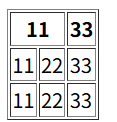
행병합 : rowspan
        <table border="1">
            <thead>
                <tr>
                    <th colspan="2">11</th><th>33</th>
                </tr>
            </thead>
            <tbody>
                <tr>
                    <td rowspan="2">11</td><td>22</td><td>33</td>
                </tr>
                <tr>
                    <td>11</td><td>22</td><td>33</td>
                </tr>
            </tbody>
        </table>
rowspan이든, colspan이든 중복 위치가 있다면 한칸씩 밀려나게 된다
pre
    <pre>
        공백을     많이     추가
            해     보    자
    </pre>
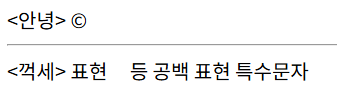
'<', '>'나 공백 표현, 특수 문자 모두 표현해주는 태그
링크 a
    <a href="https://www.naver.com/">네이버</a><br>
    <a href="https://www.naver.com/" title="홈페이지">네이버</a><br>
    <a href="https://www.naver.com/" target="_blank">네이버</a><br>
    <a href="mailto:[이메일]">na2na8 mail</a><br>
두 번째 : '홈페이지'라는 말풍선 작게 뜸
세 번째 : 새로운 탭에서 페이지 열림
네 번째 : 이메일 보낼 수 있는 창? 열
파일 path를 넣어 html 페이지를 열어볼 수도 있다.
image , img
<img src="image01.jpg" width="150px" height="100px"><br>
width, height : 크기 지정 가능. 단, 찌그러질 수 있음
link
head에서의 link
<link href="image01.jpg" rel="icon">rel으로 icon으로 사용하겠다고 지정
리스트 ol, ul, dl
    <ol>
        <li>스포츠</li>
        <li>영화</li>
    </ol>

    <ul>
        <li>스포츠</li>
        <li>영화</li>
    </ul>
ol : ordered list
ul : unordered list
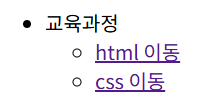
    <ul>
        <li>교육과정</li>
        <ul>
            <li><a href="#">html 이동</a></li>
            <li><a href="#">css 이동</a></li>
        </ul>
    </ul>
리스트 안의 리스트, 링크 넣기도 가능
dl, dt, dd
    <dl>
        <dt><b>HTTP</b></dt>
        <dd>
            HTML을 전달하는 프로토콜<br>
            URL은 http:// 도메인 주소로 표현
        </dd>
    </dl>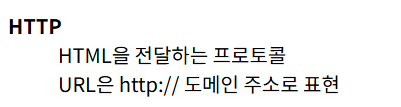
dl : 아마도 글머리 기호 없는 리스트
dt : 제목
dd : 내용
CSS
<h1 align="center" style="background-color: brown;">블록 요소</h1>align : 위치 조정
style : 배경색, 글자색 등 바꿀 수 있음

<body text="white" bgcolor="black">
text : 글자색
bgcolor : 배경색
hr 표시
    <hr size="10">
    <hr size="10" noshade>
    <hr width="50%" align="center" color="hotpink">
    <hr width="300px" align="center" color="gray">
50% : 전체화면의 50% 차지
px : 고정 pixel값 만큼의 크기

HTML 특수문자
https://knight76.tistory.com/entry/20018655335
[펌] HTML 특수문자표
HTML 특수 문자 HTML 문서에서 태그와 같이 표현 하기 위해서는 특문을 사용 해야 합니다. 그렇지 않고 꺽쇠 문자기호를 이용해서 사용 하면 브라우저에서 그대로 태그로 인식됩니다. 실제로 태그
knight76.tistory.com
<안녕> ©
<hr>
<꺽세> 표현 등 공백 표현 특수문자