참고
https://www.youtube.com/watch?v=Vj-xOhIMkZE

구글 코랩에서 진행했다.
필요 패키지를 설치한다.
!pip install neo4j-graphrag
!pip install openai
openai API KEY를 설정한다.
json으로 API KEY를 저장하여, json을 불러왔다.
import json
import os

with open('./drive/MyDrive/실습/251010_GraphRAG/openai_api_key.json') as j :
    json_file = json.load(j)
    j.close()

os.environ["OPENAI_API_KEY"] = json_file['OPENAI_API_KEY']
neo4j ERExtraction 템플릿은 다음과 같다.
from neo4j_graphrag.generation.prompts import ERExtractionTemplate

prompt_template = ERExtractionTemplate()

prompt = prompt_template.format(
    schema = '', # 필수는 아님
    text = '''
        입력 텍스트
    ''',
    examples = '' # 필수는 아님
)

print(prompt)
You are a top-tier algorithm designed for extracting
information in structured formats to build a knowledge graph.

Extract the entities (nodes) and specify their type from the following text.
Also extract the relationships between these nodes.

Return result as JSON using the following format:
{"nodes": [ {"id": "0", "label": "Person", "properties": {"name": "John"} }],
"relationships": [{"type": "KNOWS", "start_node_id": "0", "end_node_id": "1", "properties": {"since": "2024-08-01"} }] }

Use only the following node and relationship types (if provided):


Assign a unique ID (string) to each node, and reuse it to define relationships.
Do respect the source and target node types for relationship and
the relationship direction.

Make sure you adhere to the following rules to produce valid JSON objects:
- Do not return any additional information other than the JSON in it.
- Omit any backticks around the JSON - simply output the JSON on its own.
- The JSON object must not wrapped into a list - it is its own JSON object.
- Property names must be enclosed in double quotes

Examples:


Input text:


        입력 텍스트
예시
from neo4j_graphrag.llm import OpenAILLM

prompt_template = ERExtractionTemplate()
llm = OpenAILLM(model_name='gpt-4o', model_params={"temperature" : 0})

input_text = '''
    빈수와 수지는 친구입니다. 빈수는 수지를 좋아합니다.
'''

prompt = prompt_template.format(
    schema = '',
    text = input_text,
    examples = ''
)

response = llm.invoke(prompt)
response.content를 출력하면 다음과 같은 json 형태로 나온다.
{
  "nodes": [
    {"id": "0", "label": "Person", "properties": {"name": "빈수"}},
    {"id": "1", "label": "Person", "properties": {"name": "수지"}}
  ],
  "relationships": [
    {"type": "FRIENDS_WITH", "start_node_id": "0", "end_node_id": "1", "properties": {}},
    {"type": "LIKES", "start_node_id": "0", "end_node_id": "1", "properties": {}}
  ]
}
다음으로 영화 줄거리에서 graph를 추출한다.
영화 줄거리는 해리포터와 불의 잔의 줄거리를 활용하기로 했으며, 참고한 줄거리는 블로거의 줄거리를 참고했다.
<해리포터와 불의 잔> 영화 정보 줄거리 및 등장인물 결말 해석 판타지 영화 추천
영화 정보 해리포터 3인방의 흥미진진 모험 가득한 호그와트 이야기를 넘어서는 새로운 장을 여는 4편, 불의 잔이다. 상대적으로 가볍고 유쾌하고 어린이 영화 느낌이 났던 1~3편을 좋아한 관객
kimhyteblog.com
이 실습 코드는 한 줄 한 줄 사용자가 입력한 것을 바탕으로 생성하는 코드이다.
gpt-4o 사용에 제한이 있을까봐 그냥 한 줄에 다 넣었다.
import json
import neo4j
from neo4j_graphrag.experimental.components.kg_writer import Neo4jWriter
from neo4j_graphrag.experimental.components.types import Neo4jGraph

graph_json = ''
graph_history = ''
while True :
    user_input = input('이야기를 들려주세요!')

    if user_input == '완성' :
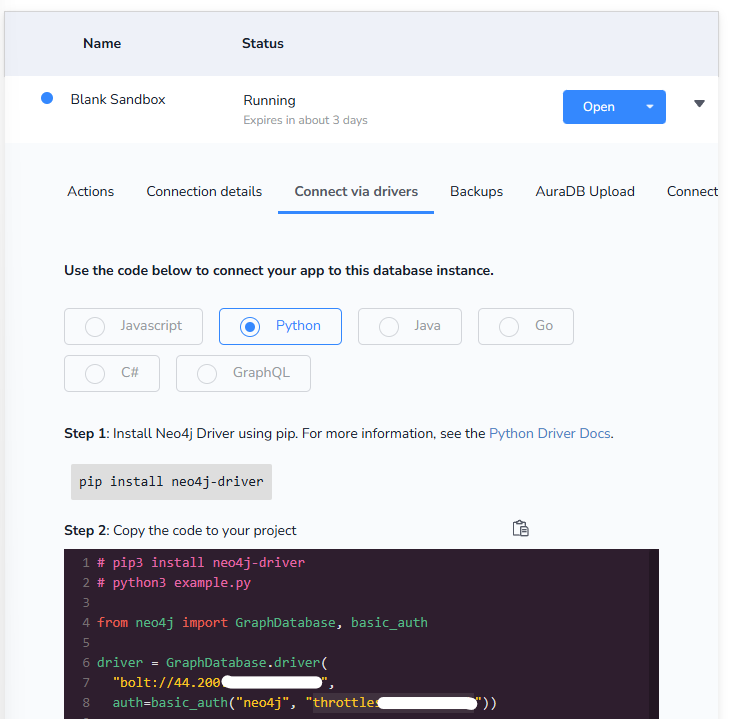
        with neo4j.GraphDatabase.driver("bolt://44.200.???.???:????", auth=("neo4j", "throttles-????-????")) as driver :
            writer = Neo4jWriter(driver)
            graph = Neo4jGraph(
                nodes = graph_json['nodes'],
                relationships = graph_json['relationships']
            )
            await writer.run(graph)
            break

    prompt = prompt_template.format(
        schema = '',
        text = user_input # 사용자가 한 줄 한 줄 영화 줄거리 입력하는 것을 받음
            + '''(Continue extracting the graph for the following input text.
                Ensure you retain the existing nodes and relationships from the graph
                and add only new nodes and relationships.\n
                Graph History : ''' + graph_history + ")",
        examples = ''
    )

    print(prompt)
    response = llm.invoke(prompt) # 그래프 추출
    print(response.content)
    graph_history = response.content

    # 간혹 답변에 ```json```이 포함되는 경우가 있어 {}를 기준으로 split
    graph_json = json.loads(graph_history[graph_history.find("{"):graph_history.rfind("}")+1])
neo4j driver 관련은 밑에 참고에 적어두었다.
참고
GraphRAG : Neo4j DB와 LangChain 결합을 통한 질의응답 구현하기 (Kaggle CSV 데이터 적용하기)
GraphRAG? 최근 LLM을 잘 활용하기 위해서는 모델이 뱉어내는 텍스트를 그대로 사용하는 것이 아닌, 데이터 베이스를 직접 구축하고 그 데이터를 기반으로 LLM이 답변하도록 구현하는 RAG(Retrieval-Au
uoahvu.tistory.com
Home - Neo4j Sandbox
sandbox.neo4j.com
무료!!!!!
Blank Sandbox로 생성하고 Connect via drivers에서 드라이버 정보를 받아온다.
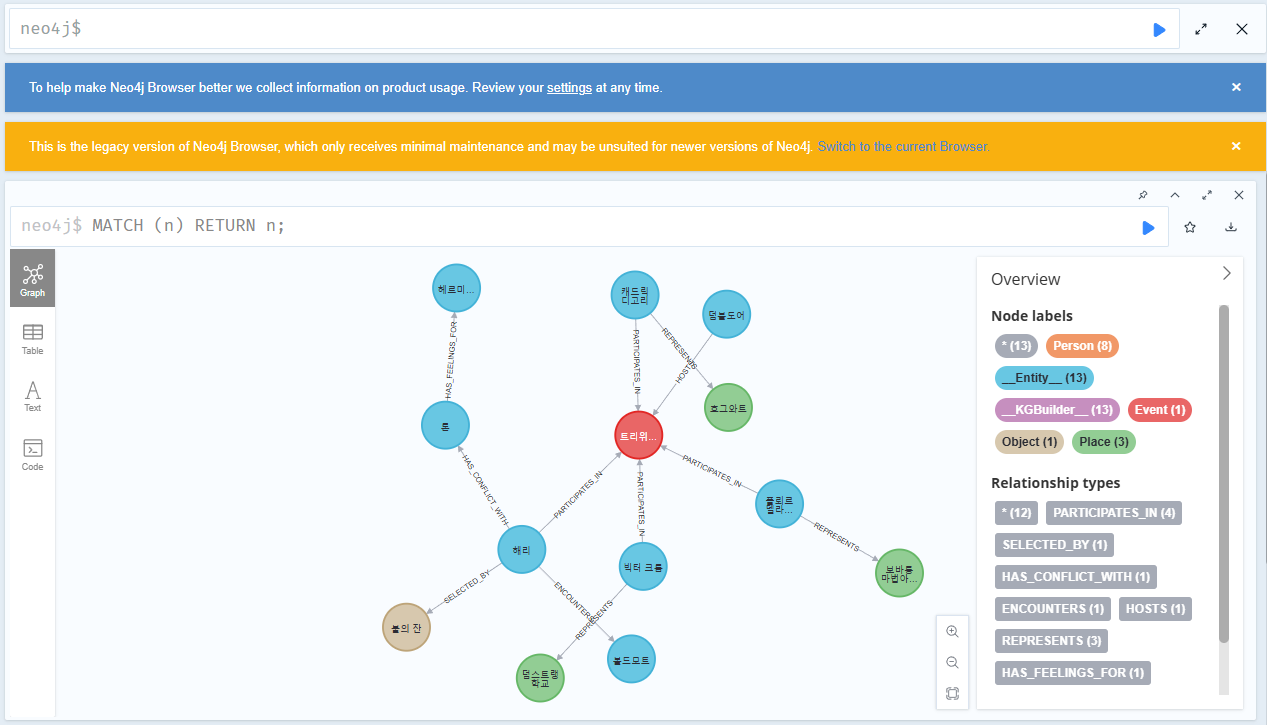
그리고 위의 '참고'에서 보이는 Open 버튼을 누르고 로그인을 해준 다음 `neo4j $`가 있는 입력창에 `MATCH (n) RETURN n;`을 입력하면 그래프가 보여진다.
'NLP > 실습' 카테고리의 다른 글
| [GraphRAG] GraphDB와 LLM으로 추천 시스템 만들기 (0) | 2025.10.30 |
|---|---|
| [GraphRAG] Neo4j 생성형 AI 패키지로 영화 줄거리 검색 엔진 만들기 (0) | 2025.10.14 |
| Agent AI 실습3 : IBM watsonx orchestrate - Intelligent assistant (0) | 2025.09.21 |
| Agent AI 실습2 : IBM watsonx orchestrate - HR Agent (0) | 2025.09.21 |
| Agent AI 실습1 : IBM watsonx Orchestrate - 마케팅 에이전트 (0) | 2025.09.21 |