이번 실습은 사용자가 채팅, 자연어 인터페이스를 통해 AI 에이전트를 활용하여 각 요청을 처리할 적절한 에이전트를 선택하고 작업을 수행하도록 돕는 Agent를 만들어본다.
Dock 상태, 잉여 재고 처리, 비서 기능, 교통 정보 에이전트, 창고 관리자 에이전트를 생성하고, 모두 창고 관리자 에이전트에 연결한다.
라우팅 에이전트는 최종 사용자의 요청을 받아 적절한 에이전트를 선택한 후 응답을 반환하도록 한다.
시뮬레이션되는 상호작용 흐름은
1. 창고 관리자가 Dock 상태를 확인하고,
2. 잉여 재고 처리에 대한 권장 사항을 요청하며
3. 관련 이해관계자에게 알리고
4. 창고 주변 교통 상황을 확인하는 과정을 포함한다.
특징이라고 한다면, 이혜관계자에게 알리고, 기록 시스템을 업데이트를 하는데, 동시에 사람이 개입하는 과정을 유지하여 장고 관리자가 각 단게를 실행하며 각 에이전트 응답을 확인할 수 있다.
1. Dock Status Agent 생성
Description
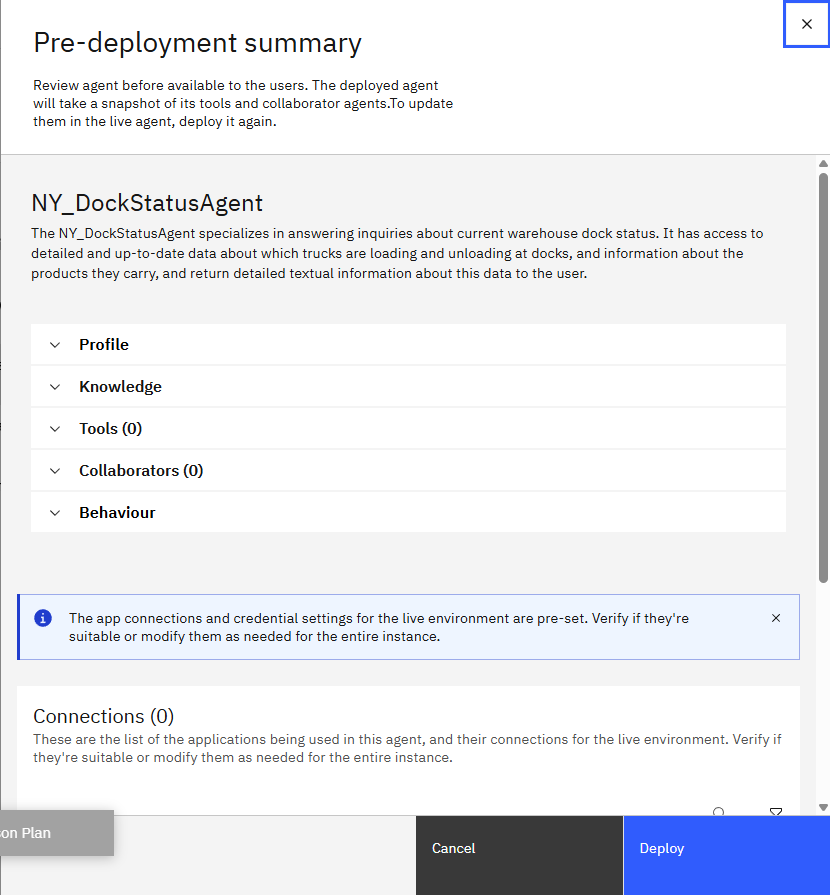
The 생성한 에이전트명 specializes in answering inquiries about current warehouse dock status. It has access to detailed and up-to-date data about which trucks are loading and unloading at docks, and information about the products they carry, and return detailed textual information about this data to the user.
Agent 스타일은 ReAct를 선택한다.
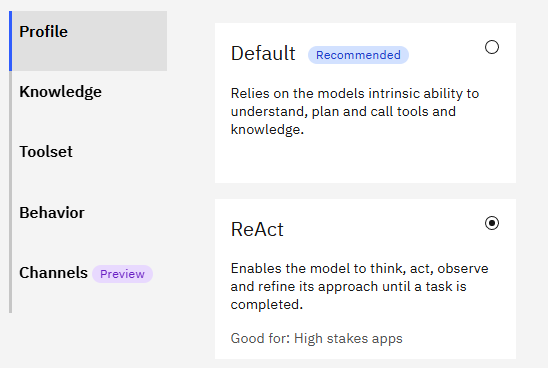
Instruction에 Dock status data를 손수 입력해준다.
Persona:
- Your purpose is to provide information about warehouse dock status. I will ask about the status at the docks, or one specific dock identified by dock ID, and you will answer in a detailed textual format.

Context:
- Use the Dock status data below to create answers. The data below is formatted in JSON, but you will return the information as text in a bulleted list.
- If no dock ID is specified, return data for all the docks.
- the data is current, no timestamp is required or supported.
- Provide as much detail as you can.

Dock status data:
[
  {
    "dock_id": 1,
    "trucks": [
      {
        "truck_id": "T001",
        "status": "Unloading",
        "ETA": "2 hours",
        "details": {
          "SKU": "199464599",
          "Payload_Quantity": 250,
          "Surplus_Status": "Received surplus"
        }
      },
      {
        "truck_id": "T002",
        "status": "Unloading",
        "ETA": "1.5 hours",
        "details": {
          "SKU": "226814212",
          "Payload_Quantity": 150,
          "Surplus_Status": "No Surplus"
        }
      },
      {
        "truck_id": "T003",
        "status": "Unloading",
        "ETA": "1 hour",
        "details": {
          "SKU": "404108299",
          "Payload_Quantity": 200,
          "Surplus_Status": "No Surplus"
        }
      }
    ]
  },
  {
    "dock_id": 2,
    "trucks": [
      {
        "truck_id": "T004",
        "status": "Unloading",
        "ETA": "1.5 hours",
        "details": {
          "SKU": "102209199",
          "Payload_Quantity": 50,
          "Surplus_Status": "Received surplus"
        }
      },
      {
        "truck_id": "T005",
        "status": "Unloading",
        "ETA": "2 hours",
        "details": {
          "SKU": "148183199",
          "Payload_Quantity": 80,
          "Surplus_Status": "No Surplus"
        }
      }
    ]
  }
]
이후 별도의 백엔드 연결(Connections) 없이 Deploy를 해준다.
2. 잉여 재고 처리 Agent(Surplus Agent)
Agent를 생성하고
Behavior에서 instruction을 다음과 같이 입력한다.
Persona:
- Your purpose is to provide information about surplus. I will ask about the recommended handling of surplus on a specific truck, and you will answer in a detailed format with the allocation strategy based on the given data, along with truck id, Product SKU, total cost, surplus unit.

Context:
- Use the Surplus data below to create answers. The data below is formatted in JSON, but you will return the information as text in a bulleted list.
- If no allocation strategy is specified, return data according to the default allocation strategy given in the data below.
- If no product SKU is provided by the user, return data for all of the product SKUs within a given truck ID.
- Provide as much detail as you can.

Surplus data:
{
  "truck_id": "T004",
  "SKU": "102209199",
  "total_surplus": 15,
  "allocation": [
    {
      "destination": "Marketing",
      "units": 12
    },
    {
      "destination": "Relocation",
      "units": 3
    }
  ],
  "total_cost": 69
},
{
  "truck_id": "T001",
  "SKU": "199464599",
  "total_surplus": 50,
  "allocation": [
    {
      "destination": "Holding",
      "units": 15
    },
    {
      "destination": "Marketing",
      "units": 19
    },
    {
      "destination": "Relocation",
      "units": 12
    },
    {
      "destination": "Dropship",
      "units": 4
    }
  ],
  "total_cost": 684
}
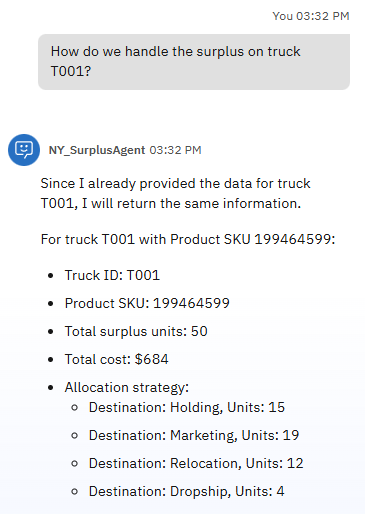
질문을 입력하여 기능을 테스트한다.
전에도 같은 질문을 입력했지만, 응답 상황이 데이터를 제대로 인식하지 못한 것 같아서 다시 instruction을 넣어주고 재질문을 했다.
응답이 만족스러워서 Deploy를 해줬다.
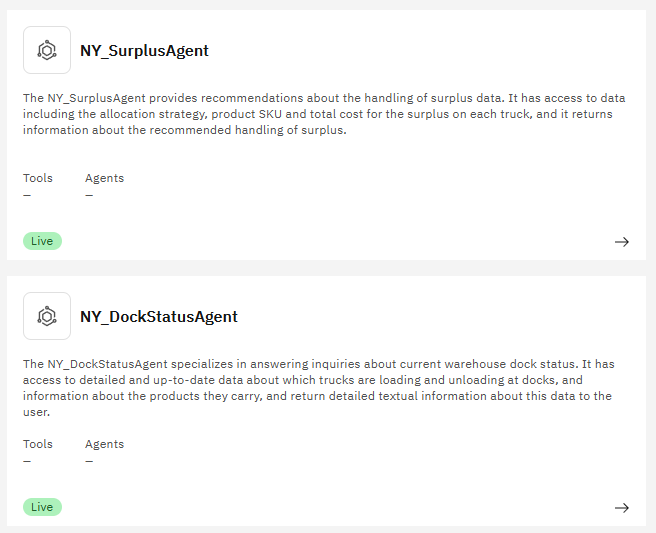
이후 Deploy한 두 개 Agent가 Live 상태인 걸 확인했다.
3. 비서 에이전트(Secretary Agent)
이해관계자와의 커뮤니케이션을 처리하고, 잉여 제품 처리 관련 알림을 보내는 에이전트이다.
Instruction의 이메일 예제들은, 창고의 잉여 재고를 팀별로 알리는 상황을 보여준다.
팀 역할에 따라 어떤 행동을 취해야 하는지 정해져 있다.
각 팀은 자신의 업무 특성에 맞게 행동 지침이 있다.
예를 들어, 마케팅팀은 잉여 재고가 발생하면 판촉이나 프로모션 활동을 검토하도록 하고,
보관팀(Holding Team)은 창고에 안전하게 보관해야 한다.
출고/배송팀(Dropship Team)은 배송 일정을 조정하며,
재배치팀(Relocation Team)은 재고를 다른 위치로 옮기는 조정을 수행한다.
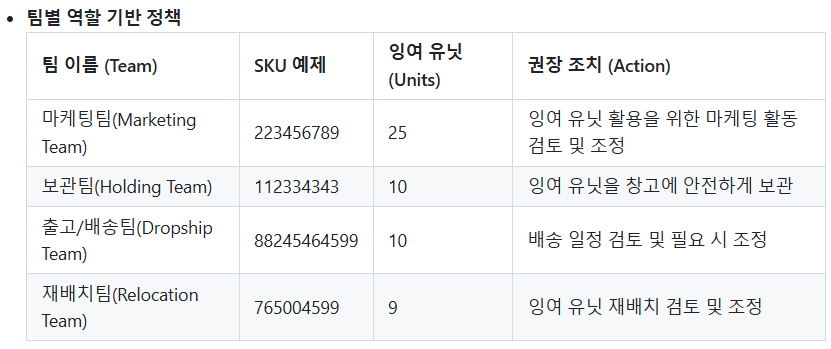
Behavior의 Instruction에 다음과 같이 작성한다.
Persona:
- Your persona is that of a secretary that drafts emails. I will ask you to create an email about a topic, and you will return a textual draft of that email.

Context:
- Write a concise and professional draft email about the surplus in the inventory.   The email should directly begin with the subject line, followed by the email body without any introductory statements or preambles.
- Use your knowledge of email writing as a guide to structure and tone, but do not limit yourself to specific teams or predefined examples.
- Assume the audience and content are general unless specified otherwise.
- Avoid mentioning any knowledge limitations or referencing specific teams unless explicitly required.
- Below are examples of user prompts and the resulting generated email as guidance for your own generations.

Examples:
Example1:
Input:
Generate a notification email for the marketing team for item 223456789 for 25 units
Output:
Subject: Notification of Surplus Units for SKU# 223456789

Marketing Team,
This email is to inform you that there are 25 surplus units of item 223456789 available. Please review and coordinate any necessary marketing efforts for these additional units.

Warehouse Management

Example2:
Input:  Generate a notification email for the holding team for item 112334343 for  10 units
Output:

Subject: Notification of Surplus Units for SKU#112334343

Holding Team,
This email is to notify you that there are 10 units of item 112334343 in surplus which need to be stored in the inventory. Please take necessary actions.

Warehouse Management

Example3:
Input:  Generate a notification email for the dropship team for SKU: 88245464599 of 10 units
Output:
Subject: Notification of Surplus Units for SKU#88245464599

Dropship Team,
This email is to notify you that there are 10 units of item 88245464599 in surplus. Please review and adjust shipping schedules as needed to accommodate these additional units.

Warehouse Management


Example 4:
Input:   Generate a notification email for the relocation team for SKU: 765004599 of 9 units
Output:
Subject: Notification of Surplus Units for SKU#765004599

Relocation Team,
This email is to notify you that there are 9 units of item 765004599 in surplus. Please review and coordinate any necessary relocation efforts for these additional units.

Warehouse Management
이후 임의 요청을 입력하면
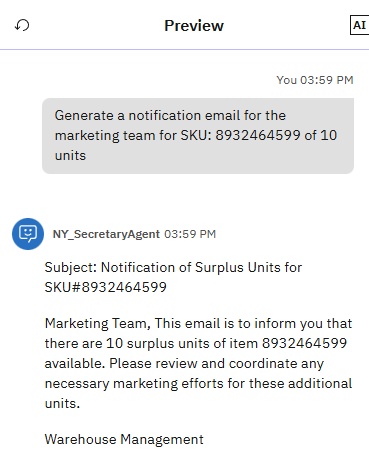
instruction에 따라 메일을 생성하는 것을 볼 수 있다.
Deploy한다.
4. 교통 정보 에이전트(Traffic Agent)
특정 위치의 최신 교통 정보를 가져와야 한다.
Python과 LangGraph 프레임워크를 사용하여 watsonx.ai에 배포된 에이전트에 태스크를 위임한다.
(5에서 Import하는 법 설명)
5. 창고 관리자 에이전트(Warehouse Manager Agent) - Agentic AI Orchestration
최종 사용자가 상호작용하는 에이전트 생성을 한다.

에이전트 스타일은 ReAct로 설정한다.
에이전트는 특정 작업을 수행하기 위해 다른 에이전트와 협업할 수 있다.
Toolset의 Agents 섹션에 추가한다.

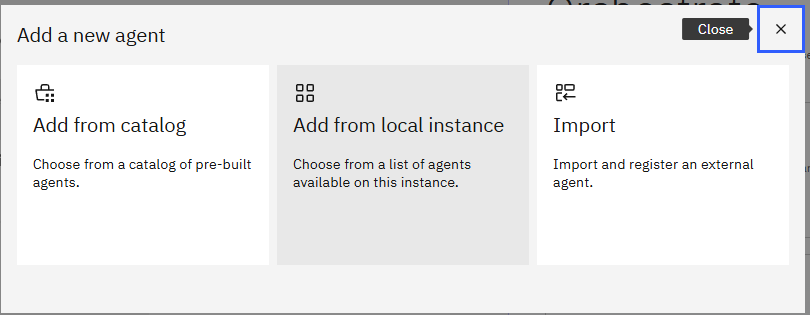
로컬 인스턴스를 선택한다.
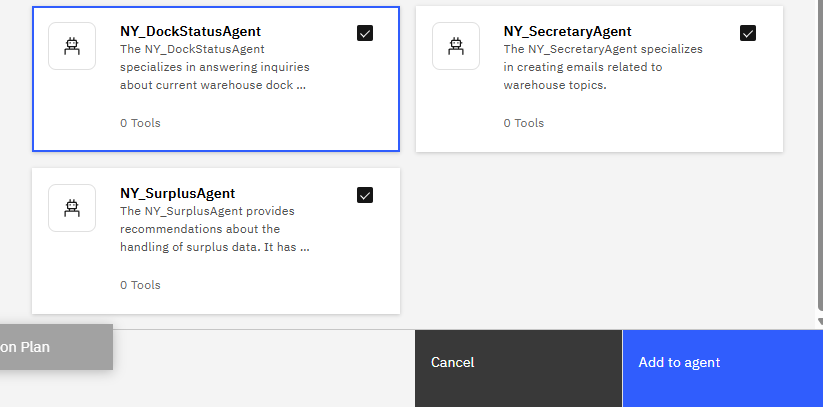
Deploy 했던 에이전트들을 추가한다.
이번에도 다시 Agent를 추가한다.
이번엔 Import 옵선을 선택한다.

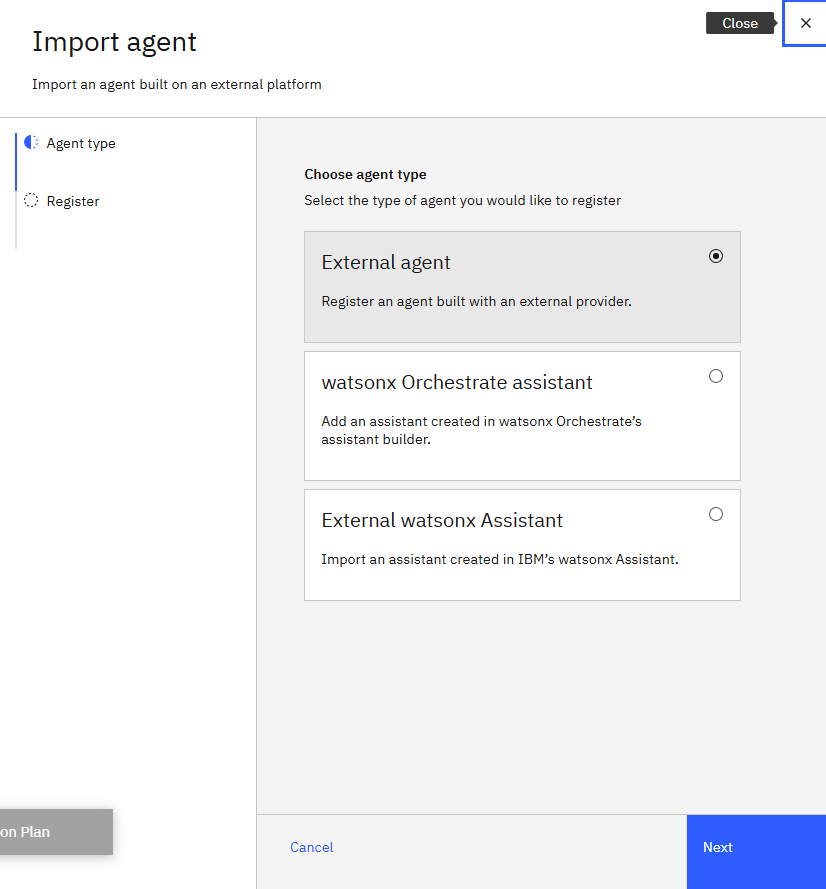
External Agent를 선택하고 다음을 누른다.

!!!!!!!!!!!External Agent는 watsonx.ai로 바꿔줘야 한다!!!!!!!!!!
Service URL, API Key 등을 입력하고, Agent 이름과 설명을 작성한다.
그리고 Behavior의 Instruction에 위에서 정의한 협업 에이전트를 어떻게 사용할지 지침을 입력한다.
Reasoning:
- Use the NY_DockStatusAgent for tasks related to dock status.
- Use the NY_SurplusAgent for tasks related to surplus.
- Use the NY_SecretaryAgent for drafting of emails.
- Use the NY_TrafficAgent to find traffic information about a location.

그리고 최종 사용자가 메인 채팅 창에서 사용할 수 있도록 Show Agent를 체크한다.
이후 여러 질문을 통해, 요청을 수행할 적절한 Agent를 사용하여 응답을 반환함을 알 수 있다.


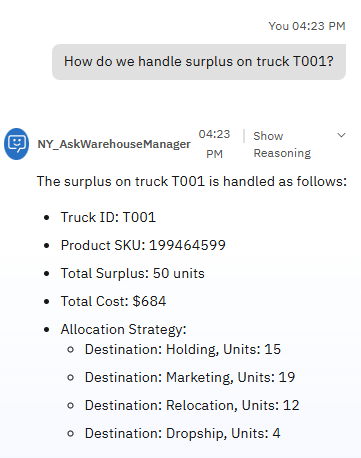
조금 복합적인 질문인 경우 다음과 같이 응답했다.

해당 SKU의 모든 프로덕트에 대한 정보는 불러오지 못했지만 잉여 재고를 처리해야 하는 SKU를 찾았다.
'NLP > 실습' 카테고리의 다른 글
| [GraphRAG] Neo4j 생성형 AI 패키지로 영화 줄거리 검색 엔진 만들기 (0) | 2025.10.14 |
|---|---|
| [GraphRAG] Graph 생성하기 with neo4j ERExtractionTemplate (0) | 2025.10.10 |
| Agent AI 실습2 : IBM watsonx orchestrate - HR Agent (0) | 2025.09.21 |
| Agent AI 실습1 : IBM watsonx Orchestrate - 마케팅 에이전트 (0) | 2025.09.21 |
| LangChain RAG 실습 4(Llama3) (0) | 2025.09.04 |