저번에 ChatGPT를 사용해서 LangChain RAG를 구현했기 때문에, 이번엔 Llama3 모델을 사용해서 구현해본다.
저번 실습에서 크롤링한 뉴스 데이터를 사용할 예정이다.
역시, 구글 코랩을 사용한다.
Llama3 구글 코랩에 설치
!pip install colab-xterm #https://pypi.org/project/colab-xterm/
%load_ext colabxterm

!pip install colab-xterm -qqq
!pip install langchain -qqq
!pip install langchain_community -qqq
colab-xterm은 코랩에서 터미널 명령어를 수행 가능하도록 한다.
패키지를 설치해준다.
# 코랩에서 터미널 윈도우 열기
%xterm
해당 명령어로 터미널 윈도우를 열 수 있다.
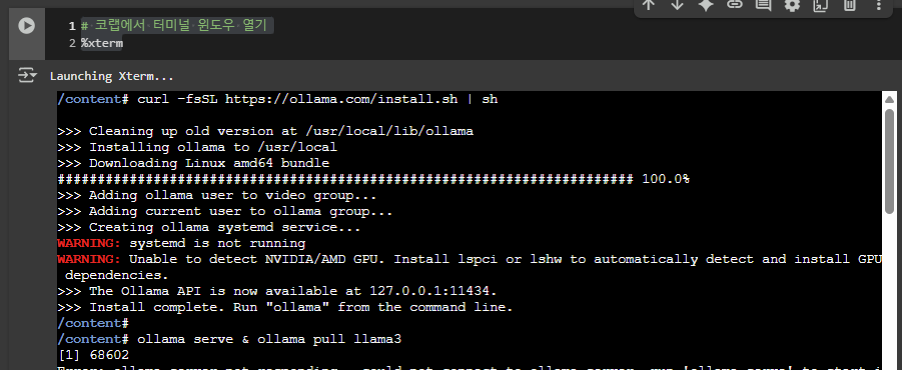
위 그림처럼, 터미널 윈도우에서 커맨드 입력이 가능하다.
curl -fsSL https://ollama.com/install.sh | sh
ollama serve & ollama pull llama3
터미널에 위의 커맨드를 입력하여 ollama를 설치하고, ollama 서버?를 llama3로 구동할 수 있도록 한다.
"ollama serve & ollama pull llama3" 커맨드 입력 후 잠깐 기다려야 llama3가 정상적으로 구동한다.
Ollama와 LangChain 결합 테스트
from langchain_community.llms import Ollama

# initiallize an instance of the Ollama model
llm = Ollama(model="llama3", base_url="http://localhost:11434")
# Invoke the model to generate responses
response = llm.invoke("What is the capital of Florida?")
print(response)
RAG 구현
데이터 준비
import os
import json

data_path = './drive/MyDrive/실습/RAG/data/'
json_paths = [data_path + json_file for json_file in os.listdir(data_path)]
뉴스를 저장한 json 데이터셋 path
!pip install langchain faiss-cpu sentence-transformers
!pip install langchain_chroma
!pip install jq
!pip install chromadb
필요 패키지 설치
from langchain_community.llms import Ollama
from langchain.chains import RetrievalQA
from langchain_chroma import Chroma
from sentence_transformers import SentenceTransformer
from langchain.embeddings import SentenceTransformerEmbeddings
from langchain.text_splitter import CharacterTextSplitter
from langchain.docstore.document import Document
from langchain_community.document_loaders import JSONLoader
필요 패키지 import
# 뉴스 기사 데이터 ChromaDB에 저장

# embedding 설정
embeddings = SentenceTransformerEmbeddings(model_name="paraphrase-multilingual-MiniLM-L12-v2")

# ChromaDB Path
DB_PATH = "./drive/MyDrive/실습/RAG/db"

# Json 파일 Path
data_path = './drive/MyDrive/실습/RAG/data/'
json_paths = [data_path + json_file for json_file in os.listdir(data_path)]

# Document 로드 후 DB에 저장
for i, json_path in enumerate(json_paths) :
    loader = JSONLoader(
        file_path=json_path,
        jq_schema=".[] | .link + \" \" + .pDate + \" \" + .title + \" \" + .description",
        text_content=False
    )

    docs = loader.load()

    if i == 0 :
        db = Chroma.from_documents(
            documents=docs,
            embedding=embeddings,
            collection_name="2025_news_llama",
            persist_directory=DB_PATH
        )

        db.get()

    else :
        db.add_documents(
            documents=docs,
            embedding=embeddings,
            collection_name="2025_news_llama",
            persist_directory=DB_PATH
        )
        db.get()
embeddings 모델의 경우, 한국어를 이해할 수 있는 multilingual 모델을 선택해야 한다.
multilingual 모델이 아닌 것을 사용하면 계속 답을 찾지 못한다는 답변만 생성한다.
# Retriever
persist_db = Chroma(
    persist_directory=DB_PATH,
    embedding_function=embeddings,
    collection_name="2025_news_llama"
)

retriever = persist_db.as_retriever()
retriever 설정
from langchain_core.runnables import RunnablePassthrough
from langchain_core.output_parsers import StrOutputParser
from langchain_core.prompts import ChatPromptTemplate
from langchain.chat_models import init_chat_model
from langchain_community.llms import Ollama
from langchain.chains import RetrievalQA

# initiallize an instance of the Ollama model
llm = Ollama(model="llama3", base_url="http://localhost:11434")

# rag_chain = RetrievalQA.from_chain_type(
#     llm=llm,
#     chain_type="stuff",
#     retriever=retriever
# )

def format_docs(docs) :
    return "\n\n".join(doc.page_content for doc in docs)

# template = """
# Question-Answering task Assistant 역할을 맡아주세요. retrieved context를 사용하여 답변해주세요(Answer in Korean).
# 만약에 답을 알지 못한다면, 모른다고 답해주세요.
# 최대 3문장으로 간결하게 답해주시고, 답변에 사용한 document를 인용해주세요(url과 날짜).

# 질문 : {question}

# Context : {context}

# Answer :
# """

template="""
You are a Question-Answering task Assistant who answers the question using retrieved context.
Answer the question based on the retrieved context in Korean.
If you don't know the answer, please say that "죄송합니다. 잘 모르겠어요.".
You can answer maximum 3 sentences, please quote the document you used(url and date).
Answer in KOREAN

Question : {question}

Context : {context}

Answer :
"""

prompt = ChatPromptTemplate.from_template(template)

rag_chain = (
    {"context" : retriever | format_docs, "question" : RunnablePassthrough()}
    | prompt
    | llm
    | StrOutputParser()
)
Llama3의 경우 ChatGPT보다 한국어에 익숙하지 않은지, 저번에 썼던 템플릿을 사용하면 영어로 답변한다.
그래서 다른 템플릿을 써봤는데...
question = "오늘은 2025년 6월 4일입니다. 최근 한화와 T1의 전적이 어떻게 되나요?"
rag_chain.invoke(question)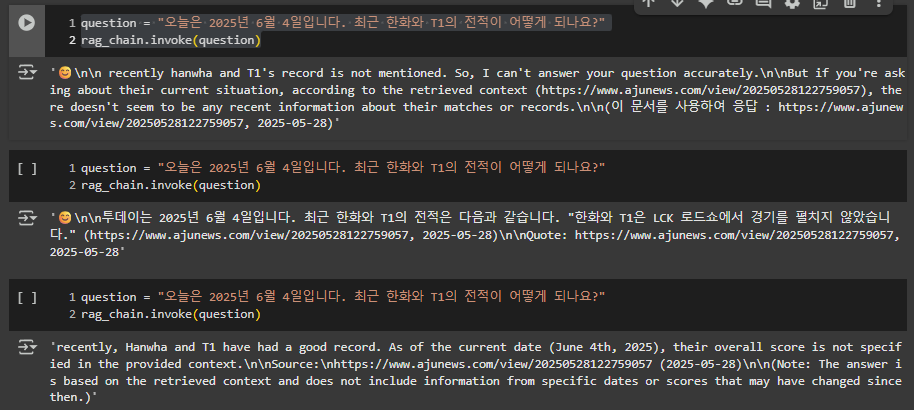
인용은 하는데 답변이 명확하지 않고 , 영어로 계속 나오는 문제점이 있다.
다음 번엔 템플릿을 수정하여 한국어로 대답을 잘 하도록 개선해보겠다.
참고
Run Llama 3 and Langchain Locally in Google Colab to Build a RAG Solution: A Step-by-Step Guide
In the rapidly evolving world of artificial intelligence, leveraging the latest tools and models is crucial for staying ahead of the curve…
drlee.io
https://littlefoxdiary.tistory.com/128
Llama3 한국어 성능 테스트 | Colab에서 Meta-Llama-3 모델 사용해보기🦙
GPT-4에 비견할만한 성능을 가진다는 Meta의 오픈소스 LLM Llama3를 사용해보자! Llama 3 모델 Llama 3 모델 특징8B & 70B 파라미터 규모의 모델으로, MMLU, HumanEval 등 벤치마크 태스크에서 경쟁모델보다
littlefoxdiary.tistory.com
[NLP] Multilingual Embedding 모델 간단 비교
Sentence Transformers의 multiligual embedding model 성능 간단 비교
velog.io
'NLP > 실습' 카테고리의 다른 글
| Agent AI 실습2 : IBM watsonx orchestrate - HR Agent (0) | 2025.09.21 |
|---|---|
| Agent AI 실습1 : IBM watsonx Orchestrate - 마케팅 에이전트 (0) | 2025.09.21 |
| LangChain RAG 실습 4(Llama3) (0) | 2025.09.04 |
| LangChain RAG 실습 2(네이버 뉴스 기사 크롤링) (0) | 2025.06.09 |
| LangChain RAG 실습(네이버 뉴스 기사 크롤링) (3) | 2025.06.04 |